Lesson Objectives
By the end of this lesson, you should be able to:
- Understand Standards & Protocols - Explain what network standards and protocols are and why they are important.
- Know Application Protocols - Be familiar with FTP, HTTP, HTTPS, POP3, SMTP, SSH and their uses.
- Understand Email Systems - Explain how emails are sent and received using different protocols.
- Explain TCP/IP - Understand the TCP/IP protocol suite and how data moves through its layers.
- Understand FTP Systems - Explain FTP client software and servers and how file transfers work.
Student Login
Access exclusive lesson resources, notes, and materials.
Standards and Protocols
What is a Standard?
A network standard is a set of agreed requirements for hardware and software. Standards are important as they allow manufacturers to create products and programs that will be compatible with products and programs from other manufacturers.
Why are Standards Important?
- Universal Compatibility: Standards ensure devices can communicate seamlessly (e.g. your smartphone connecting to Wi-Fi)
- Design Efficiency: Simplify development by providing established guidelines, saving time and effort
- International Trade: Globally adopted standards facilitate product export and import across borders
- Consistency: Provide guidelines on device identification, data flow, and security maintenance
What is a Protocol?
A protocol is a set of rules that allow computers to communicate over a network.
Why are Protocols Important?
- Protocols serve as standardized sets of rules for formatting and processing data
- Computers with diverse software and hardware can communicate effectively by following protocols
- Ensure consistency and interoperability (e.g. both computers using IP can communicate)
- Without common protocols, communication breaks down
Application Layer Protocols
Application layer protocols establish standards for applications communicating over networks. They define rules for what should be sent but not how data is physically transmitted.
HTTP and HTTPS
HTTP (Hypertext Transfer Protocol): Used for accessing and receiving web pages in HTML format on the Internet.
HTTPS (Hypertext Transfer Protocol Secure): An extension of HTTP that protects communication between web servers and browsers by encrypting data.
Key Difference:
- HTTP: Sends data in plain text, vulnerable to interception
- HTTPS: Secures connections using encryption and data validation
FTP (File Transfer Protocol)
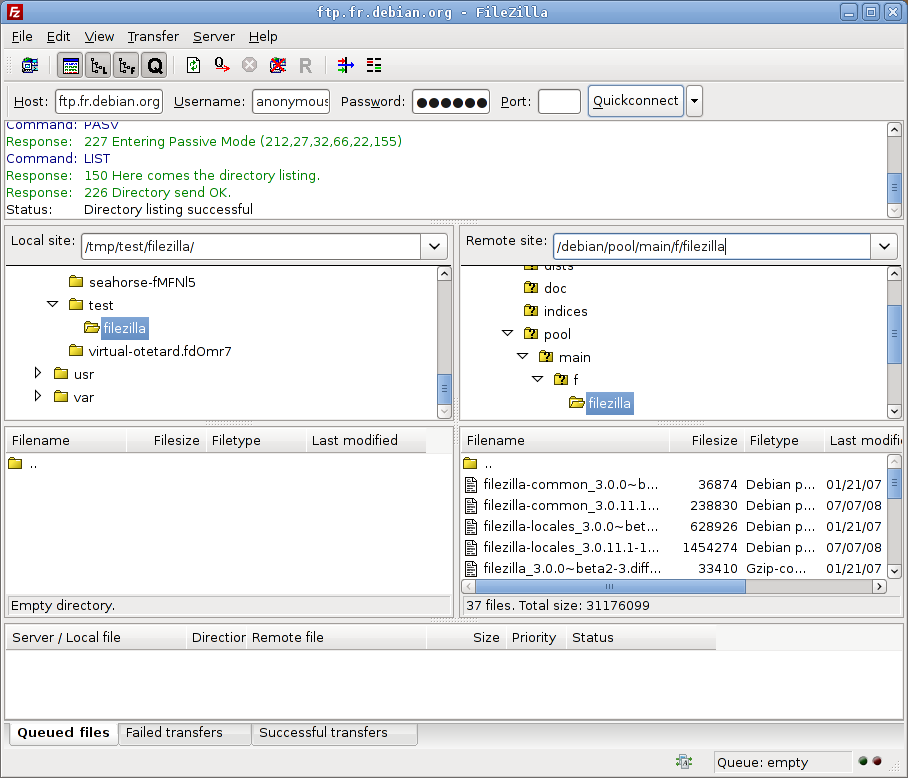
FTP is a standard network protocol used for transferring files between computers over TCP-based networks like the Internet.
- Operates on a client-server architecture
- Users authenticate with username and password (plain-text)
- Uses separate data (port 20) and control (port 21) channels
- Can provide anonymous access without login
- FTP client software connects to FTP servers to upload/download files
Email Protocols
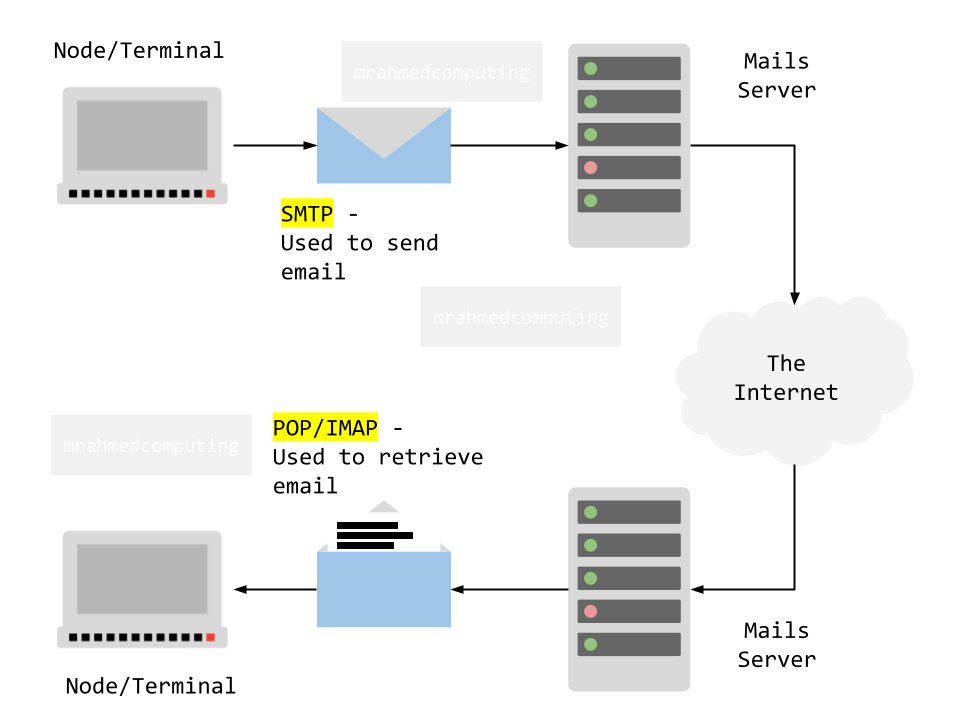
SMTP (Simple Mail Transfer Protocol):
- Responsible for sending emails from a client to a mail server
- Handles delivery process when you click "send"
- Communicates with recipient's mail server to relay messages
IMAP (Internet Message Access Protocol):
- Incoming mail protocol for accessing email stored on a mail server
- Keeps email synchronized across multiple devices
- Downloads only headers initially, fetches full content when opened
POP3 (Post Office Protocol version 3):
- Downloads entire emails from server to local device
- Removes emails from server after download
- Useful for local backups but less suitable for multiple devices
How Email Works:
- You compose an email and click send
- Your email client uses SMTP to send it to your mail server
- Your mail server uses SMTP to forward it to recipient's mail server
- Recipient uses POP3 or IMAP to retrieve the email from their server
SSH (Secure Shell)
SSH provides secure encrypted connections for remote login and command execution on networked devices.
- Replaces insecure protocols like Telnet
- Encrypts all communication to prevent eavesdropping
- Used for remote system administration and file transfers
Advertisement.
Network Ports
A port serves as a virtual endpoint where network connections start and end. These software-based ports are managed by a computer's operating system.
- Each port is associated with a specific protocol
- Using different ports allows computers to distinguish between types of traffic
- Example: Emails and webpages arrive over the same connection but are directed to different ports
Common Application Protocols and Port Numbers:
| Port Number | Protocol | Purpose |
|---|---|---|
| 20 | FTP (DATA) | File Transfer Protocol Data |
| 21 | FTP (CONTROL) | File Transfer Protocol Control |
| 22 | SSH | Secure Shell Remote Login |
| 23 | Telnet | Unencrypted Remote Login |
| 25 | SMTP | Simple Mail Transfer Protocol |
| 80, 8080 | HTTP | Hypertext Transfer Protocol |
| 110 | POP3 | Post Office Protocol v3 |
| 143 | IMAP | Internet Message Access Protocol |
| 443 | HTTPS | HTTP Secure |
TCP/IP Protocol Suite
TCP/IP (Transmission Control Protocol/Internet Protocol) is a fundamental framework for organizing communication protocols used on the Internet and similar computer networks.
Key Components:
- TCP (Transmission Control Protocol): Ensures reliable, ordered, error-checked delivery of data streams between applications
- IP (Internet Protocol): Handles addressing and routing of data packets across networks based on IP addresses
- TCP is connection-oriented while IP is connectionless
- Together they form the foundation of internet communication
The TCP/IP Stack (Internet Protocol Suite)
The TCP/IP Stack defines four layers in which different protocols operate to pass data packets across a network. Each layer carries out different roles in the communication process.
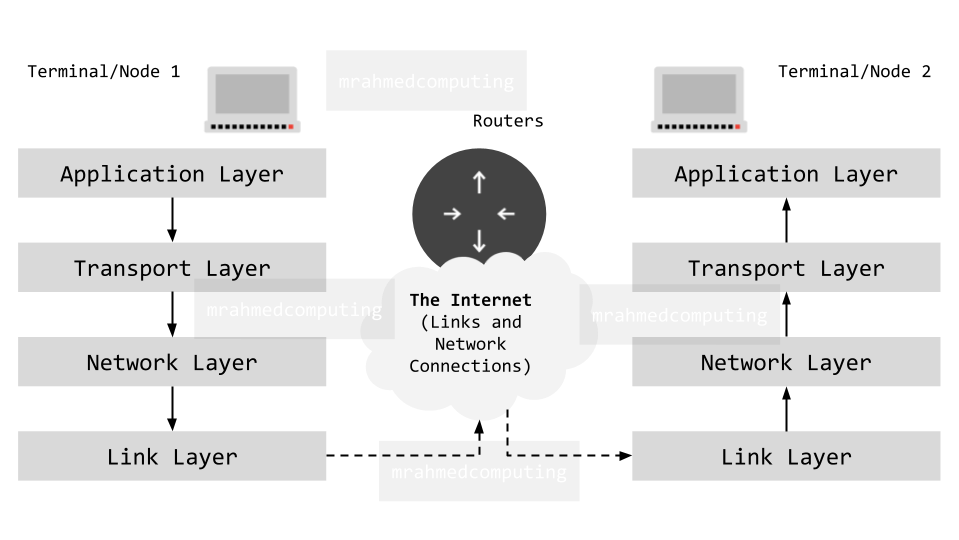
1. Application Layer
- Where network applications operate (email, web browsers, etc.)
- Applications select appropriate protocols for specific tasks
- Protocols: HTTP, HTTPS, FTP, SMTP, POP3, IMAP, SSH
- Defines rules for what should be sent during communication
2. Transport Layer
- Establishes communication between two computers (hosts)
- Key tasks: connection setup, packet sizing, numbering, reassembly, error handling
- Uses TCP for reliable delivery or UDP for faster, connectionless delivery
- Adds port numbers to identify applications
3. Network Layer
- Routers operate at this layer
- Forwards data packets from one network to another
- Adds destination IP addresses to packets
- Uses routing tables to determine optimal paths
- Creates sockets (IP address + port number combinations)
4. Link Layer
- Deals with physical hardware connections
- Components: Network Interface Cards (NICs), cabling, OS device drivers
- Adds MAC addresses of source and destination devices
- MAC addresses change with each hop through network devices
Data Transmission Through TCP/IP Layers
Sending Data - Encapsulation Process
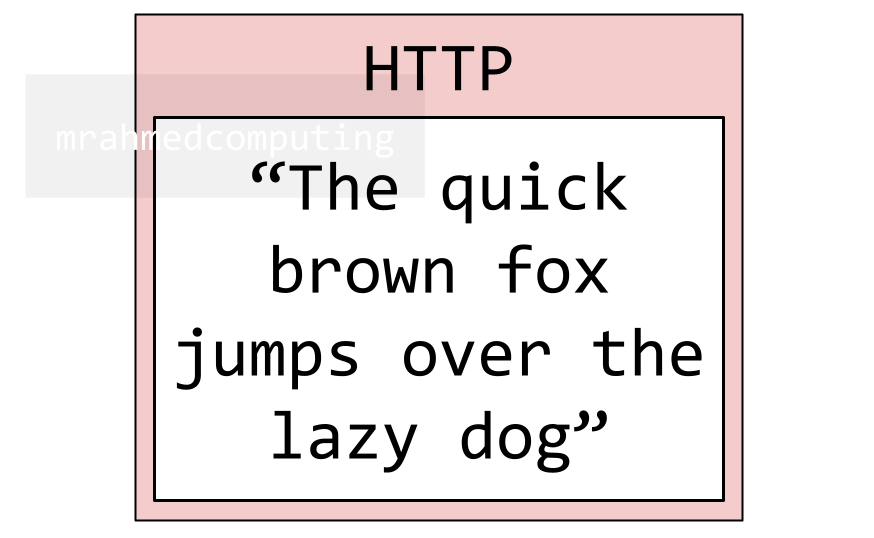
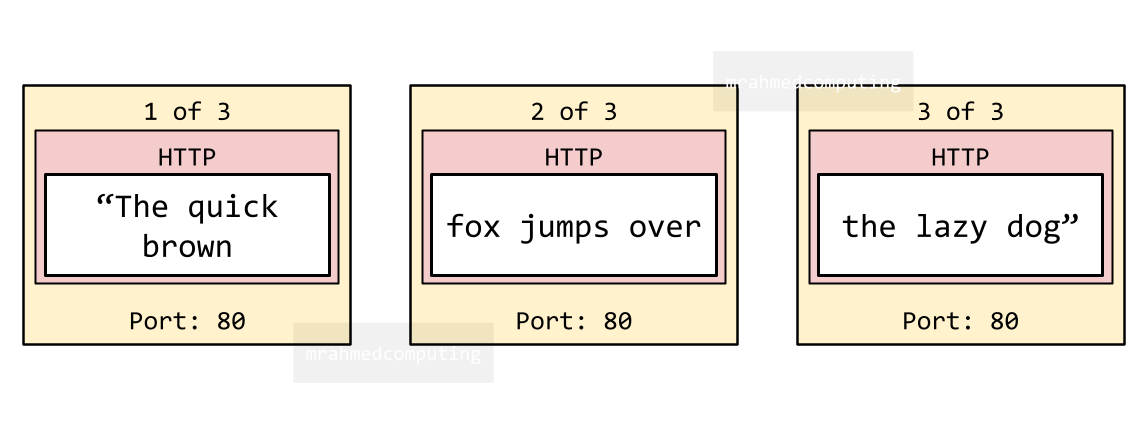
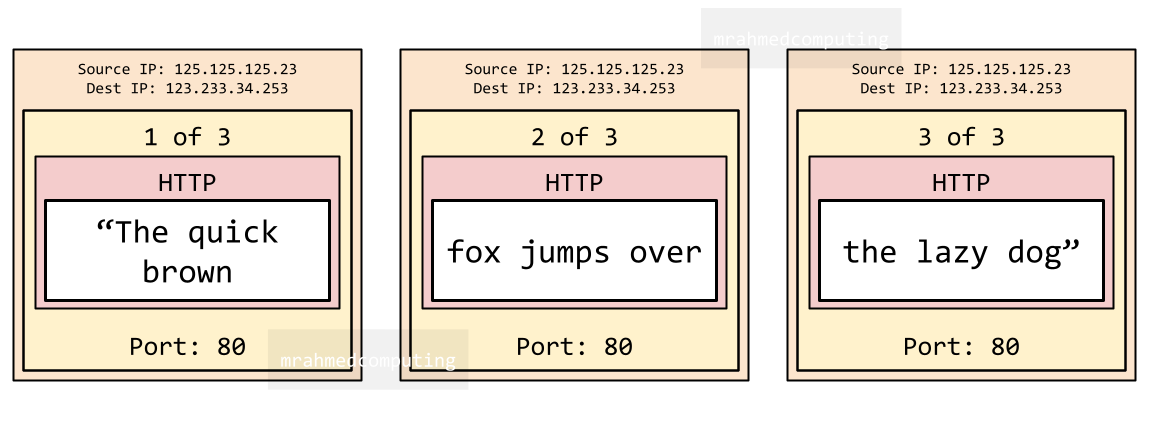
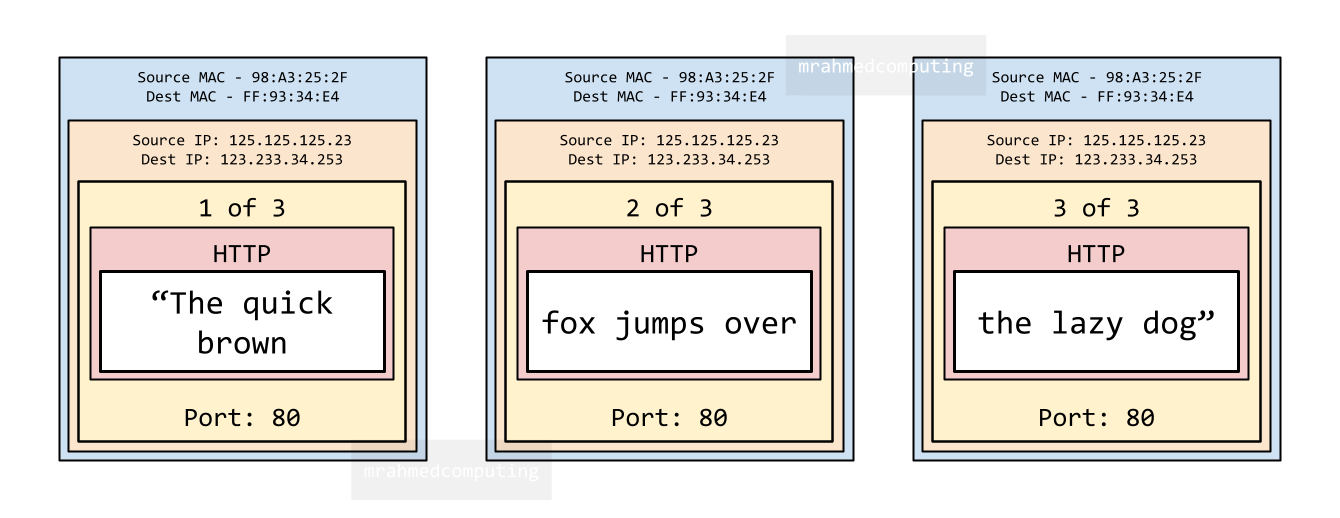
Example: A web page request containing "The quick brown fox jumps over the lazy dog"
Application Layer:
- Browser uses HTTP protocol to request the web page
- Creates application data with the message
Transport Layer:
- Uses TCP to establish connection with recipient
- Splits data into numbered packets
- Adds port number (e.g. 80 for HTTP)
Network Layer:
- Uses IP to address packets with source/destination IP addresses
- Creates sockets (IP address + port combination)
- Routers use routing tables to forward packets
Link Layer:
- Adds MAC addresses of source and destination devices
- MAC addresses change at each network hop
Receiving Data - Decapsulation Process
- Link Layer: Removes MAC addresses, passes packets to Network layer
- Network Layer: Removes IP addresses, passes to Transport layer
- Transport Layer: Reassembles packets in correct order, requests any missing packets, passes data to Application layer
- Application Layer: Uses correct protocol (HTTP) to display web page for user
MAC Addresses vs. IP Addresses
IP Addresses (IPv4)
An IP address (Internet Protocol address) is a unique numerical label assigned to devices on a network, allowing it to communicate.
195.246.108.227
- Format: IPv4 = four 8-bit numbers (32-bit total)
- Type: Logical addresses that can change
- Layer: Network Layer (Layer 3)
- Purpose: Identify devices on a network for routing
How an IP Address Works: When you go online, your Internet Service Provider (ISP) assigns an IP address to your device. All your internet activity flows through the ISP, which uses this address to route information back to you. This address can change (e.g. when you restart your router).
MAC Addresses
A MAC address (Media Access Control Address) is a unique identifier assigned to a Network Interface Controller (NIC). It helps identify specific devices on a local network to ensure data is sent to the correct device (e.g. your computer, not a smartphone on the same network).
A MAC address consists of a 12-digit hexadecimal number, with each pair of digits separated by a colon or hyphen.
4B:24:A2:73:0E:F1
- Format: 12-digit hexadecimal number
- Type: Physical addresses that don't change
- Layer: Link Layer (Layer 2)
- Purpose: Unique hardware identifier burned during manufacturing
- Feature: Can identify a unique device globally
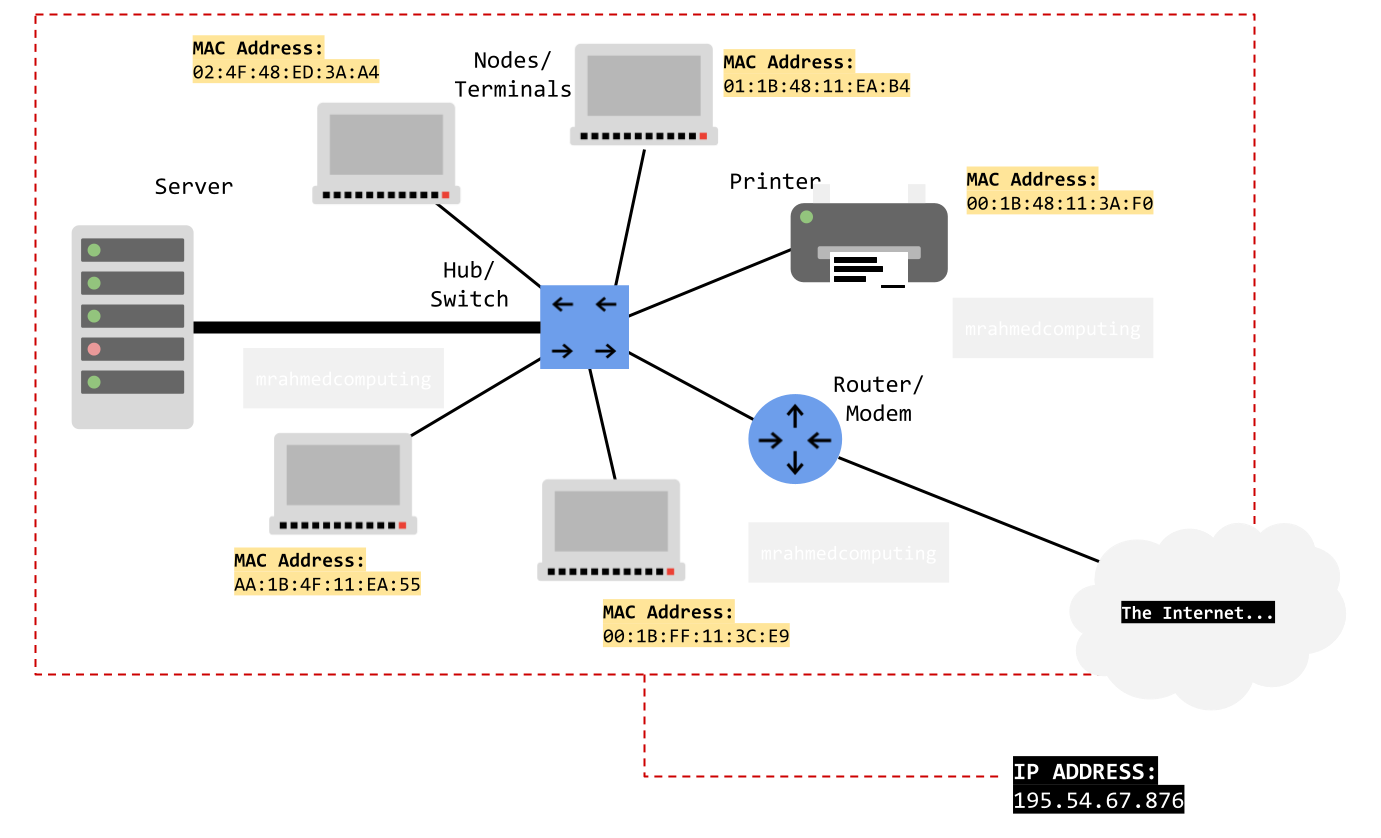
Note: While a MAC address identifies a device on a local network, the actual geographical location of a networked device can be determined by its IP address.
Benefits of Layered Network Models
- Modularity and Abstraction: Breaks complex tasks into manageable layers, each with specific functions
- Promotes Interoperability: Standard interfaces allow different vendors' systems to communicate seamlessly
- Ease of Development and Maintenance: Developers work on individual layers without affecting others; updates to one layer don't impact the entire system
- Troubleshooting: Easier to identify and fix problems within specific layers
- Education: Simplifies learning by separating network functions conceptually
UDP (User Datagram Protocol)
UDP maintains an open data connection to send a continuous stream of packets without verifying if they are received correctly.
- Connectionless: Doesn't establish dedicated connections like TCP
- Faster: Lower overhead than TCP
- No Error Recovery: Doesn't retransmit lost packets
- Best For: Real-time applications where speed matters more than reliability
- Examples: Video streaming, online gaming, VoIP, DNS queries
- Key Concept: Useful where waiting to fill gaps from lost packets doesn't make sense
Advertisement.
Lesson Summary
- Standards: Agreed requirements ensuring compatibility between different manufacturers' products
- Protocols: Sets of rules enabling computers to communicate over networks
- Application Protocols: HTTP/HTTPS (web), FTP (file transfer), SMTP/POP3/IMAP (email), SSH (secure remote access)
- Ports: Virtual endpoints (20/21 FTP, 25 SMTP, 80 HTTP, 110 POP3, 143 IMAP, 443 HTTPS, etc.)
- TCP/IP Stack: Four-layer model (Application, Transport, Network, Link) for internet communication
- TCP: Reliable, connection-oriented protocol with error checking and retransmission
- IP: Handles addressing and routing using IP addresses
- MAC Addresses: Physical hardware identifiers (Layer 2) that don't change
- IP Addresses: Logical network identifiers (Layer 3) that can change
- UDP: Faster, connectionless alternative to TCP for real-time applications
- Layered Models: Provide modularity, interoperability, and easier development/maintenance
- Data moves down layers when sending (encapsulation) and up layers when receiving (decapsulation)